
Unreal Engine 5 · AI assistant
An AI assistant that works inside Unreal Engine 5
Dola AI for Unreal Engine 5: a desktop app and UE 5.7 Editor plugin that edits Blueprints, drives the editor, and writes C++. With real limits and pricing.
Last updated 31 October 2026
The short answer
Dola AI (dolaai.pro) is an AI assistant for Unreal Engine 5. It is two pieces: the Dola desktop app for Windows and Linux, and an Unreal Editor plugin that connects the open editor to that app over a local bridge. You describe a task in chat; specialist agents read your project, act in the running editor, and report what changed.
It is built for the Unreal loop: Blueprint graphs, levels, assets, materials, Play in Editor, and C++ source in the same project. If most of your day is generic code outside Unreal, a general AI IDE is the better primary tool, and many people use both.
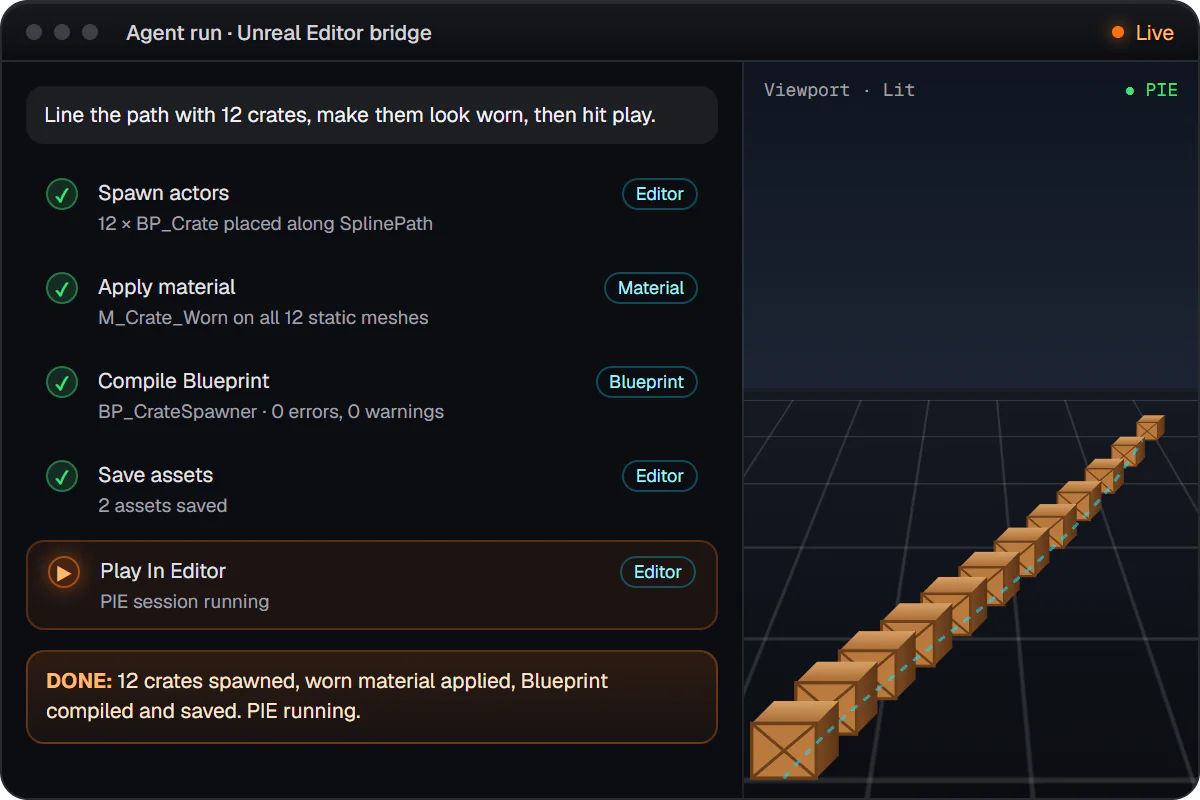
What it can do in a UE5 project
- Blueprints: read graphs, find the right node, add and wire nodes, set variables and components, compile, save, and tidy the layout (Blueprint AI in detail).
- Editor actions in plain language: levels, assets and imports, materials, animation, Niagara, UI widgets, audio, Sequencer, gameplay AI assets, and project settings such as gameplay tags and default maps (editor actions).
- Engine API lookup: checks that classes, functions, and Blueprint nodes really exist in your engine before using them (Engine API reference).
- C++ source: new actor and component classes, UPROPERTY / UFUNCTION exposure, and fixes for build errors you paste in (C++ tools).
- Playtesting: Play in Editor runs with pass/fail checks, Unreal automation tests, and performance traces (playtesting and QA).
- Project knowledge: a local index of assets, Blueprints, levels, and dependencies, so answers fit your project (project knowledge).
- Safety rails: named checkpoints with rollback, and approval prompts in chat before risky actions such as plugin or config changes, new C++ classes, packaging, and force deletes (plans, checkpoints, and approvals).
Every tool, with example prompts and requirements, is in the tools reference.
Real limitations
- The plugin is published for Unreal Engine 5.7 only, for Windows and Linux editors. No macOS editor support, and no self-built (source) engines.
- Downloads need a free signed-in account; there is no public direct download link.
- Dola does not compile your C++ for you after each edit. You build in Unreal or your IDE as usual, and can paste errors back for a fix.
- Running Python scripts inside the editor is planned, not available yet.
- It is an editor teammate, not a runtime feature: it does not ship gameplay NPC AI inside your game (see NPC AI vs developer assistants).
- Modeling mode is a separate Babylon.js studio in the app that exports GLB, not the Unreal viewport.
How it compares
| Kind of tool | Works in the live editor | Best at |
|---|---|---|
| Dola AI (app + UE plugin) | Yes, through its own plugin | Blueprints, editor work, and UE C++ in one chat |
| AI IDEs (Cursor, Copilot) | Not by default; possible with an MCP bridge | Source code across many languages |
| Terminal agents (Claude Code) | Not by default; possible with an MCP bridge | Repo-wide edits and shell builds |
| MCP servers for Unreal | Yes, as a bridge for another AI client | Exposing editor actions to the client you pick |
Longer, honest write-ups: Dola AI vs Cursor, Claude Code for Unreal Engine, and Unreal Engine MCP and Dola.
Pricing
Downloading Dola and creating an account are free. Running agents uses AI credits from a paid plan.
Monthly plans include AI credits:
- Indie: $10 per month, includes $10 of AI credits each paid month.
- Pro: $50 per month, includes $50 of AI credits each paid month.
- Pro+: $100 per month, includes $100 of AI credits each paid month.
- Max: $200 per month, includes $200 of AI credits each paid month.
Unused included credits reset on renewal. Current prices are on plans.
Get started
- Sign up free (free).
- When you have access, download the desktop app from the signed-in Releases page (download guide).
- Sign in from the app and attach your .uproject.
- Click Install Dola plugin, then open Unreal Editor so the bridge connects (connect a project).